
Illuminates Research with your own local AI Assistant for free with privacy using Node.js + Ollama (No Cloud, No API Keys!)
Ever felt overwhelmed by a mountain of research papers?
Imagine being able to upload a PDF and get a crystal-clear summary in seconds — right from your own computer. No API keys. No cloud services. No privacy trade-offs.
In this guide, I’ll walk you through how to build your own AI-powered Research Assistant using Node.js and Ollama. By the end, you’ll have a working tool that processes PDFs, summarizes content, and runs 100% locally.
Whether you’re a student, researcher, or lifelong learner, this project will save you hours of time — while keeping your data safe.
Why Run AI Locally?
Before diving in, let’s pause for a moment. Why not just use ChatGPT or some online summarizer tool?
✅ Privacy — Your documents stay on your machine. Sensitive research data never leaves your computer.
✅ Cost — No subscription fees or token charges. Once set up, it’s free to use.
✅ Control — You decide which models to use, how to fine-tune them, and when to upgrade.
✅ Speed — With modern CPUs (or GPUs), local inference is faster than you think.
This isn’t just a cool project — it’s a step toward digital independence.
🛠️ Step 1: Setting Up Your Project
First things first: let’s set up our workspace.
- Create a folder and name it something like
ResearchAssistant. - Open it in Visual Studio Code (or your favorite IDE).
- Open a terminal and initialize your Node project:
npm init -y
Generating a package.json file.
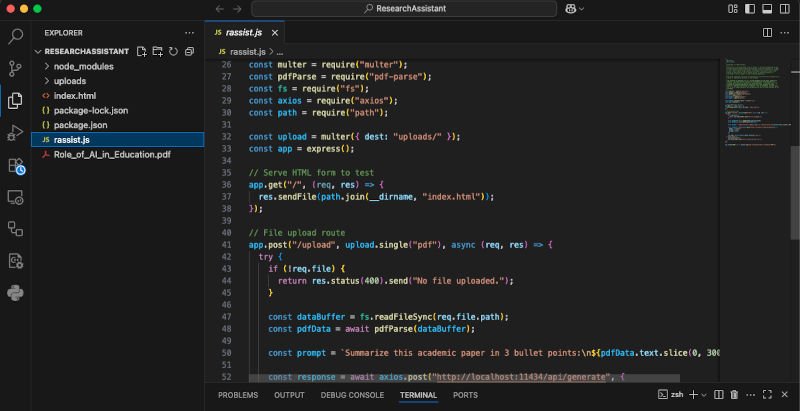
Next, create a file called:
rassist.js
The brain of your assistant is this file — handling PDF uploads, extracting text, and talking to your local AI model.
📦 Step 2: Installing Dependencies
Now let’s install the libraries we need.
Run this in your terminal:
npm install express multer pdf-parse fs axios
Here’s what they do:
- Express → Creates a local server.
- Multer → Handles file uploads.
- pdf-parse → Reads and extracts text from PDFs.
- fs → Helps with file handling.
- axios → Sends requests to the AI model.
🔑 Important: You’ll also need Ollama installed and a model like llama3.2 downloaded. If you’re new to Ollama, check out our blog on setting up Ollama locally. https://clytheravox.com/how-to-run-ai-locally-set-up-ollama
▶️ Step 3: Running Your Project
Once everything is installed, fire up your app:
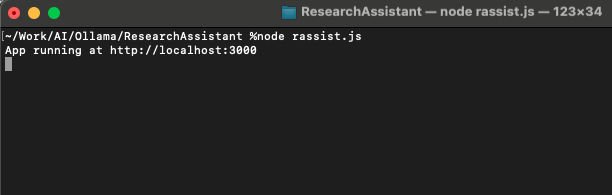
node rassist.js
If all goes well, you’ll see:
Server running at http://localhost:3000
🎉 Congrats — your assistant is alive!
🧪 Step 4: Testing with Postman
Here comes the fun part: testing!
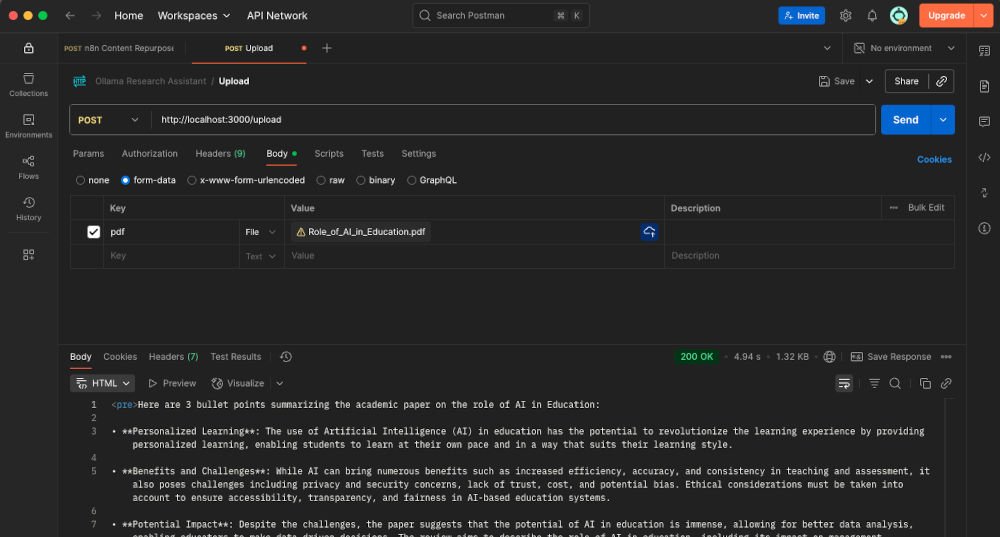
Open Postman and create a POST request to:
http://localhost:3000/upload
- Go to the Body tab → select form-data.
- Add a key named
pdf(set it to type File). - Upload any research paper.
- Hit Send.
Within seconds, you’ll receive a clean AI-generated summary.
It’s like having a research buddy sitting at your desk — ready 24/7.
🖥️ Step 5 (Optional): Adding a Simple HTML Interface
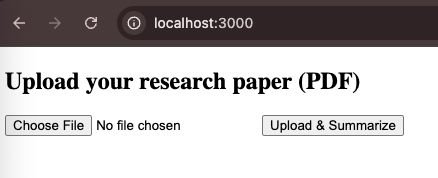
Not a fan of Postman? Let’s add a simple, user-friendly web interface.
Create a file called index.html and paste this:
<form action="/upload" method="post" enctype="multipart/form-data">
  <input type="file" name="pdf" accept=".pdf" />
  <button type="submit">Upload & Summarize</button>
</form>
Now visit:
http://localhost:3000
Upload a paper, hit submit, and watch the summary appear in your browser.
🔍 Bonus: Customizing Your AI
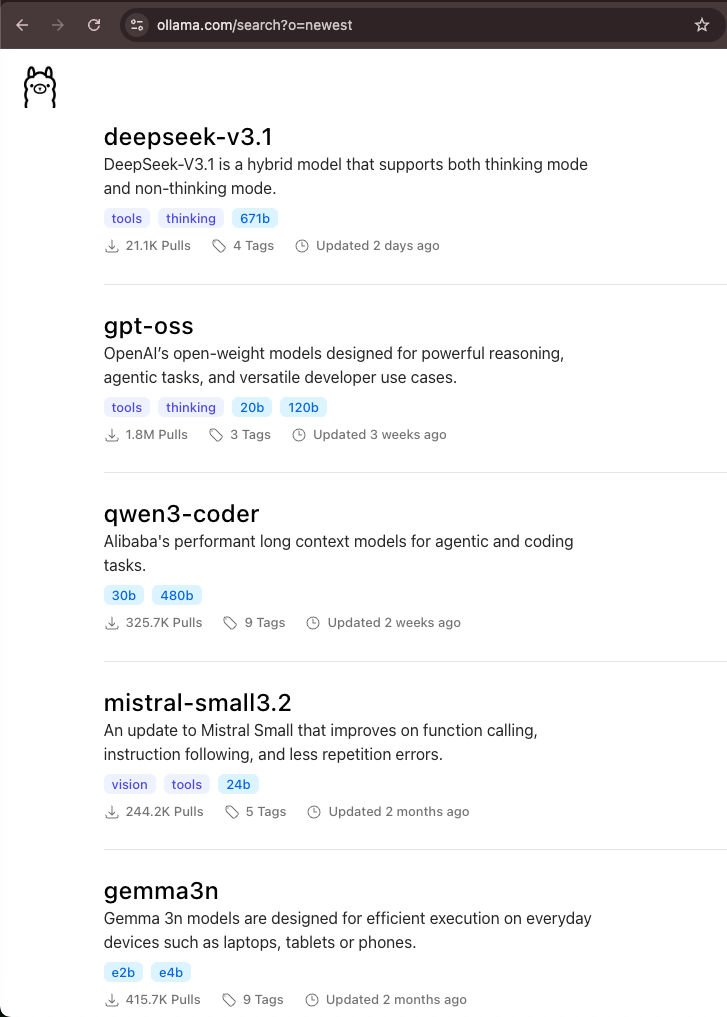
The real magic? You can choose different models depending on your needs:
- Mistral → Smaller, faster model for quick summaries.
- Llama 3 → More powerful, better for nuanced understanding.
- Custom fine-tuned models → Adapt to your research field (e.g., medical, legal, or technical papers).
And since everything runs locally, switching models is just a command away.
💡 Real-World Applications
This isn’t just for students — it’s useful across industries:
- Academics → Summarize papers before diving deep.
- Lawyers → Condense lengthy contracts or case files.
- Healthcare → Parse clinical studies.
- Business Professionals → Extract insights from market reports.
- Everyday Learners → Make sense of dense technical books.
Wherever there’s too much text, your assistant can help.

⚡ Why This Project Matters
We’re living in a world where information overload is the norm. AI isn’t just about futuristic robots — it’s about helping us think better, faster, and clearer.
By running AI locally, you’re taking back control. Instead of being locked into big tech’s servers, you’re building tools on your own terms.
This project isn’t just about summarizing PDFs. It’s about exploring what’s possible when AI meets personal creativity.
✅ Final Thoughts
And there you have it! In just a few steps, you’ve built your own AI Research Assistant:
- Upload PDFs → Get instant summaries.
- Works entirely on your computer.
- Privacy-first, fast, and customizable.
👉 Try experimenting with different models, add features like keyword extraction, or even build a chatbot that can answer questions about your papers.
This is just the beginning.
So — next time you face a 40-page research paper, remember: you’ve got AI on your side.
Stay curious. Stay creative. And keep building.
📌 Resource Links
- 🔗 GitHub Repository for the source files.
- 🐪 Ollama Models https://ollama.com/search
- 💡 Bonus tip: Try running smaller models for speed, or larger ones for deeper understanding.
Watch our video: