
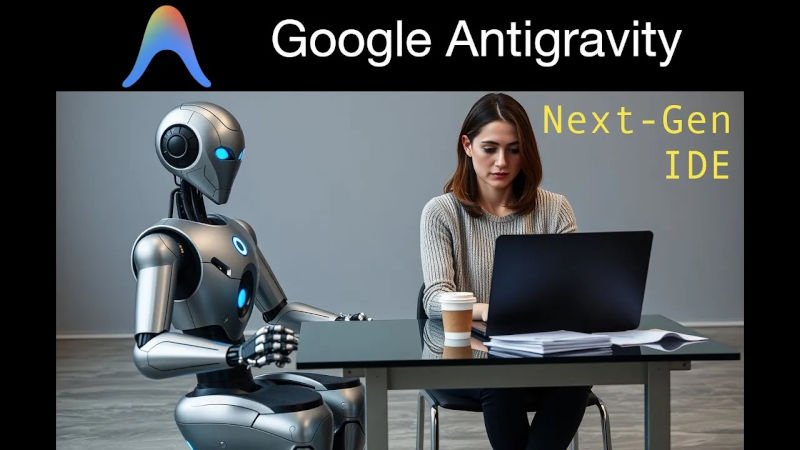
What if coding didn’t begin with a blinking cursor… but with a conversation?
What if your IDE didn’t just autocomplete… but understood your entire codebase?
And what if you could build complete applications in minutes — with architecture, documentation, and tests — by simply describing your intent?
Welcome to Google Antigravity, Google’s bold leap into the future of AI-powered software development.
In this article, we’ll explore:
- What Antigravity is
- Its breakthrough features
- Why developers are excited
- How it compares to AI IDEs like Cursor
- A real, step-by-step practical example
- How it could transform the future of software engineering
This isn’t just another coding tool.
It’s the beginning of a new era — where AI is no longer a helper, but a full-fledged engineering collaborator.
🌌 What Is Google Antigravity?
If traditional IDEs are your workspace, Antigravity is your co-engineer.

Google Antigravity is a next-generation development environment powered by Google’s Gemini AI models and multi-agent reasoning system. It combines:
- IDE
- LLM coding assistant
- Architecture planner
- Debugger
- Teacher
- Codebase analyst
- Multi-agent engineering system
In short, it is a fully intelligent development environment — built to understand code the way humans do, but at the scale machines can handle.
How It Works Behind the Scenes
Antigravity uses three core intelligence layers:
1️⃣ Repository Intelligence Layer
Reads and understands your entire codebase, including patterns, conventions, and history.
2️⃣ Multimodal Reasoning Layer
Understands code, APIs, errors, logs, diagrams, comments, natural language… even screenshots.
3️⃣ Multi-Agent Engineering System
Different AI agents specialize in tasks like:
- Documentation
- Unit testing
- Performance optimization
- Code generation
- Refactoring
- Debugging
These agents collaborate — and even debate — to produce the best solution.
🚀 Why Antigravity Is a Game-Changer
Let’s break down the features that are getting the developer community excited.
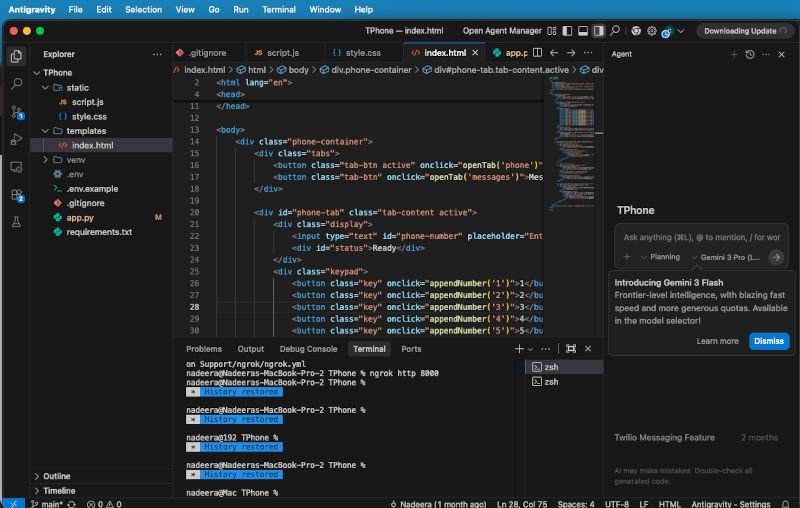
1. Deep Codebase Understanding (Not Just Autocomplete)
Most AI IDE tools work at a local or file-level context. They predict what you might type next.
Antigravity does something far more powerful:
✔ Reads your entire repository
✔ Detects architecture patterns
✔ Understands dependencies
✔ Recognizes your coding style
✔ Remembers past decisions
✔ Predicts improvements
This means you no longer need to carry every detail in your head.
Your IDE now understands your project as well as you do — sometimes better.
2. Natural Language Code Creation
Imagine saying:
“Generate a React dashboard with light/dark mode, user login, and a data table using a REST API.”
…and instantly getting:
- Frontend components
- API integration
- CSS and theming
- Folder structure
- Reusable hooks
- Comments and documentation
With Antigravity, this becomes your new normal.
3. AI Debugging That Explains Why
Debugging has always been one of the most time-consuming parts of development.
Antigravity changes the game by:
- Identifying logical inconsistencies
- Highlighting root causes
- Suggesting fixes
- Auto-patching the code
- Explaining its reasoning
You don’t just get the fix — you learn the reasoning.
For students and self-learners, this is revolutionary.
4. Smart Refactor Engine
Large-scale refactoring is notoriously painful.
Moving to new frameworks. Cleaning old architectures. Migrating to microservices.
Antigravity can do it all — with a single sentence.
“Refactor this entire backend into a modular architecture.”
The system rewrites multiple files, updates imports, ensures compatibility, and preserves logic.
It even gives you a diff explaining what changed and why.
5. Interactive Sandbox Execution
Antigravity can run code in an isolated environment and explain:
- What each function did
- How variables changed
- Why certain branches executed
- Performance bottlenecks
- API failure points
This is like having a real-time narrator inside your runtime.
6. Multi-Agent Collaboration
Instead of one assistant, you get an entire AI engineering team.
Testing Agent
Writes unit, integration, and end-to-end tests.
Refactor Agent
Cleans code, improves structure.
Debugging Agent
Finds issues, explains root causes.
Documentation Agent
Updates Wiki, README, API docs.
Performance Agent
Finds slow areas, suggests optimizations.
It’s like having a 24/7 engineering team… without the payroll.
🆚 Antigravity vs Cursor: Which One Leads the Future?
The rise of AI-powered IDEs has made Cursor a favorite among modern developers.
But Google Antigravity pushes the concept even further.

Cursor Strengths
- Fast and efficient
- Strong AI-powered autocomplete
- Great for coding quickly
- Practical PR automation
- Lightweight and responsive
Cursor is a supercharged copilot.
Antigravity Strengths
- Deep architecture-level understanding
- Multi-agent collaboration
- Google Gemini integration
- Full repository context
- Multimodal support
- Advanced debugging explanations
- Codebase-level refactoring
- End-to-end system design
Antigravity isn’t just helping you code.
It’s thinking with you.
1-Sentence Summary
Cursor accelerates coding.
Antigravity reimagines coding.
🧪 A Real Example: Building a Weather API in Seconds

Here’s a real example.
Prompt You Type in Antigravity:
“Create a Python Flask API called
/weatherthat takes a city name and returns temperature, humidity, and conditions using OpenWeatherMap API.
Add error handling, caching, logging, and write unit tests.
Also, generate a README explaining how to run it.”
What Antigravity Generates Instantly:
✔ app.py with Flask routing
✔ API integration code
✔ Error handling for missing city, network errors
✔ Caching layer for optimization
✔ Logs for API response & errors
✔ test_weather.py with pytest
✔ README.md with setup steps
✔ Requirements.txt
Then You Say:
“Improve performance.”
Antigravity updates the logic with:
- Async requests
- Better caching strategy
- Reduced API calls
- Faster JSON parsing
One More Command:
“Deploy to Cloud Run.”
Antigravity produces:
- Dockerfile
- Cloud Run config
- Deployment script
- CI/CD template
🌍 How Antigravity Changes the Developer Experience

1. Less Time Fixing, More Time Creating
Developers spend 40% of their time debugging and refactoring.
Now those tasks shrink dramatically.
2. Lower Cognitive Load
No more juggling dependencies and architecture in your head.
3. Ideal for Beginners
Antigravity explains concepts in simple language — making it a perfect learning companion.
4. Perfect for Professionals
AI-augmented coding feels like working with senior engineers who don’t get tired.
5. Faster Project Delivery
Startups, freelancers, and teams can build products 2–5× faster.
6. Code Consistency
AI agents enforce best practices automatically.
🔮 The Future of Coding: What Antigravity Reveals
Antigravity isn’t just a new tool.
It’s a preview of where software engineering is heading:

1. Developers Become System Designers
Writing every line becomes optional.
The job shifts toward designing, orchestrating, and reviewing.
2. Coding Becomes Collaborative
You talk to AI agents the way you’d talk to human teammates.
3. Multimodal Development Becomes Normal
Screenshots > long debugging messages
Diagrams > text explanations
Speech > typing
Mixed-language coding > single-language constraints
4. Quality Rises, Errors Fall
With continuous AI review, codebases become cleaner over time.
5. Education Transforms
Students can learn by asking AI to explain concepts at any difficulty level.
6. Solo Builders Become Powerhouses
One person can build what used to require a team of 5–10.
🧭 Final Thoughts: A New Era of AI-Augmented Engineering
Google Antigravity marks a milestone:
The moment AI stopped assisting… and started co-engineering.
We’re entering a future where developers:
- Think more
- Code less
- Build faster
- Learn continuously
- Collaborate with intelligent systems
If tools like GitHub Copilot and Cursor accelerated coding, Antigravity redefines it.
The question isn’t:
Will AI change how we code?
The real question is:
Are you ready to build in the era of intelligent IDEs?
Watch our Video: