
Unlocking Creativity with Leonardo AI: A Guide to Using It Effectively
In the ever-expanding world of generative AI, Leonardo AI stands out as a creative powerhouse tailored for artists, designers, marketers, and tech enthusiasts. Whether you’re crafting game assets, generating concept art, or designing visuals for social media, Leonardo AI offers a streamlined, intuitive interface powered by advanced diffusion models. But how do you get the most out of it?
Here’s a quick guide to using Leonardo AI effectively, with practical examples and tips.
1. Navigating the New Interface
Leonardo AI’s latest update introduces a streamlined interface, enhancing user experience with features like:
- Presets: Replacing the older ‘Alchemy’ system. Presets allow users to apply predefined styles such as lifelike vision, anime, cinematic, and concept art with ease.
- Advanced Settings: Fine-tune models like ‘AlbedoBase XL’ for specific stylistic outcomes.
- Transparency Mode: Generate images with transparent backgrounds directly, facilitating seamless integration into various projects.
- Social Media Dimensions: Quickly create images tailored for platforms like Instagram, Facebook, and TikTok.
These enhancements aim to provide a more intuitive and efficient workflow for users across different creative fields.
2. Getting Started: Choose the Right Model
Leonardo AI offers a diverse array of fine-tuned models, each catering to specific artistic needs:
- Leonardo Vision XL: A versatile model suitable for realistic, artistic, and CG images, delivering high-quality, photorealistic outputs.
- PhotoReal: Specializes in generating hyper-realistic photos and lifelike portraits, excelling in facial features and detailed imagery.
- Illustrative Albedo: Generate high quality illustrations.
- Leonardo Anime XL: Designed for anime-style illustrations, providing vibrant and stylized outputs.
- Phoenix: First foundational model, marking a significant advancement in AI image generation. Phoenix is designed to deliver high-quality images with improved coherence and style consistency, making it suitable for a wide range of applications, from concept art to marketing visuals..
👉 Tip: Choosing the appropriate model aligns the AI’s strengths with your creative vision, ensuring optimal results..
3. Prompting Like a Pro
Leonardo AI relies heavily on text prompts. The clearer and more descriptive your input, the better the output.
Example Prompt for a Fantasy Character:
“A female elven archer with glowing blue eyes, standing in a moonlit forest, wearing leather armor, fantasy style, ultra-detailed, soft lighting, cinematic background.”
Use commas to separate concepts and adjectives. You can also guide the aspect ratio, style, and lighting.
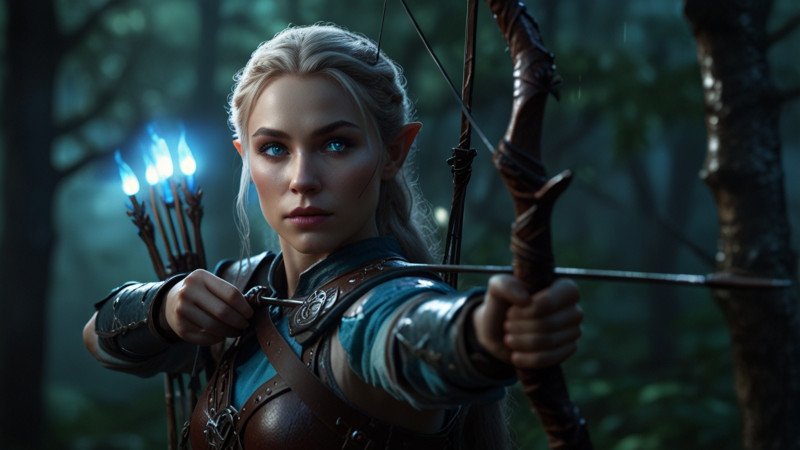
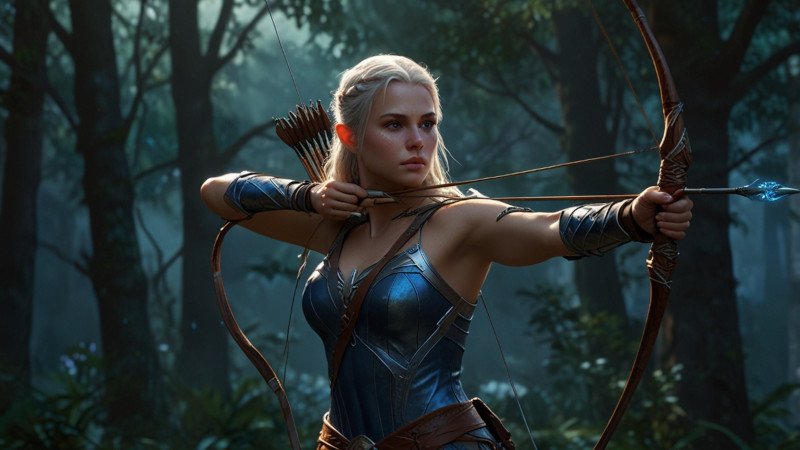
Don’t forget to use the AI Prompt improvement feature. If you have a shorter prompt, it can enhance it to add any additional details. Here is how it enhanced the above prompt.
“A strikingly ethereal elven archer, her eyes shimmering with an otherworldly blue glow, stands amidst the tranquil moonlit forest. Clad in intricately crafted leather armor, she exudes a sense of grace and power. The scene is depicted in a meticulously detailed painting, where soft lighting enhances the cinematic atmosphere. Every aspect of the archer is masterfully rendered, from the delicate features of her face to the intricate patterns on her armor. The overall effect is a mesmerizing blend of fantasy and realism, conveying a sense of mystique and wonder to the viewer.”
👉 Tip: Combine specific style descriptors like “cyberpunk,” “watercolor,” or “isometric view” to refine your vision.
4. Utilizing Elements for Style Consistency
The platform now features Elements, a tool that allows users to apply specific styles to their images effortlessly. By selecting an Element, such as ‘cyberpunk’ or ‘watercolor,’. Creators can ensure visual consistency across their projects, streamlining the design process.
5. Practical Use Cases
a. Use Case 1: Game Asset Creation:
Utilize models like Leonardo Vision XL to generate characters, environments, and items for game development.
b. Use Case 2: Marketing & Branding:
Create compelling visuals for campaigns using PhotoReal, ensuring high-quality imagery for advertisements and social media.
Example Prompt:
“Modern flat illustration of a digital marketer at a computer, colorful gradients, minimalist style, Instagram-friendly.”

Use aspect ratio tools (1:1 or 9:16) to fit specific platforms, and add stylization terms to match your brand’s look.
c. Use Case 3: AI Art for Print or Merchandise Design:
Design unique artwork for products like t-shirts, posters, and album covers, leveraging the stylized outputs of Leonardo Anime XL.
“Surreal skull with neon flowers, psychedelic style, black background, vivid colors, perfect for merch design.”
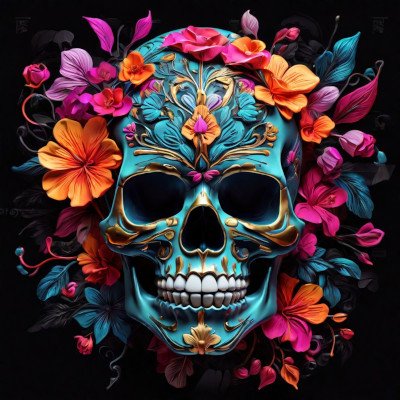
You can upscale images within Leonardo to ensure quality output for printing.
6. Save and Organize with Projects
Leonardo AI lets you create Projects to organize and categorize your assets. This is especially useful if you’re working across multiple themes or clients.
7. Enhancing Workflow with New Features
Leonardo AI’s updated interface includes features that streamline the creative process:
- Flow State: Offers a continuous stream of visual possibilities from a single prompt, aiding in rapid ideation.
- Transparent PNG Generator: Allows for the creation of images with transparent backgrounds, facilitating easy integration into various projects.
- AI Video Generator: Transforms static images into animations, opening new avenues for storytelling and content creation.
Final Thoughts
Leonardo AI is more than a text-to-image tool—it’s a creative partner. With a bit of prompt crafting and model selection, you can unlock professional-grade visuals in minutes. Whether you’re prototyping a game world, crafting marketing visuals, or just experimenting, Leonardo AI helps turn your ideas into art—effortlessly.
Leonardo AI’s advancements in 2025 position it as a formidable tool in the creative industry. By understanding its new models and features, users can unlock a new realm of artistic possibilities. Whether you’re a seasoned designer or a budding artist, Leonardo AI offers the tools to bring your visions to life with unprecedented ease and quality.
Try using it today: https://app.leonardo.ai