

Artificial intelligence feels a bit like magic sometimes. You give it a prompt, and suddenly you get answers, insights, solutions… even artwork. But behind this magic, there are tools that act like the “workshops” where ideas become systems—and one of the most popular tools among students, researchers, creators, and AI professionals is something incredibly simple:
A notebook running inside your browser.
Welcome to JupyterLab, a powerful, flexible, and surprisingly beginner-friendly workspace that helps you experiment with AI, explore data, visualize ideas, and build tiny—or massive—projects with ease.
In this week’s AI Fun Fact of the Week, we’re going deeper into why JupyterLab is often described as the ultimate AI playground… and why you should absolutely consider using it, even if you’re just getting started.

What Exactly Is JupyterLab? (And Why Does Everyone Love It?)
JupyterLab is an interactive development environment built with one idea in mind:
Make coding, learning, experimenting, and visualizing as simple as writing in a notebook.
Instead of running programs in a terminal or writing long scripts in a code editor, JupyterLab lets you break your work into cells—small blocks that you run one at a time.
This “step-by-step thinking” approach mirrors how humans learn, think, and experiment.
Want to test a small idea?
Run one cell.
Want to plot a quick graph?
Run one cell.
Want to send a prompt to an AI model?
Run one cell.
This is why students love it.
Researchers love it.
And AI creators—like yourself—absolutely rely on it.
The Magic Behind JupyterLab: Why It Feels So Fun
Let’s explore what makes JupyterLab feel different from regular coding tools.
1. It’s visual — like a sketchbook for your ideas
You can write code…
Run the code…
See the output appear right below the cell.
This is a game-changer for learning and experimenting.
Example: Turning a function into a chart
import numpy as np
import matplotlib.pyplot as plt

x = np.linspace(-10, 10, 400)
y = x**2

plt.plot(x, y)
plt.show()
Boom — instant graph.
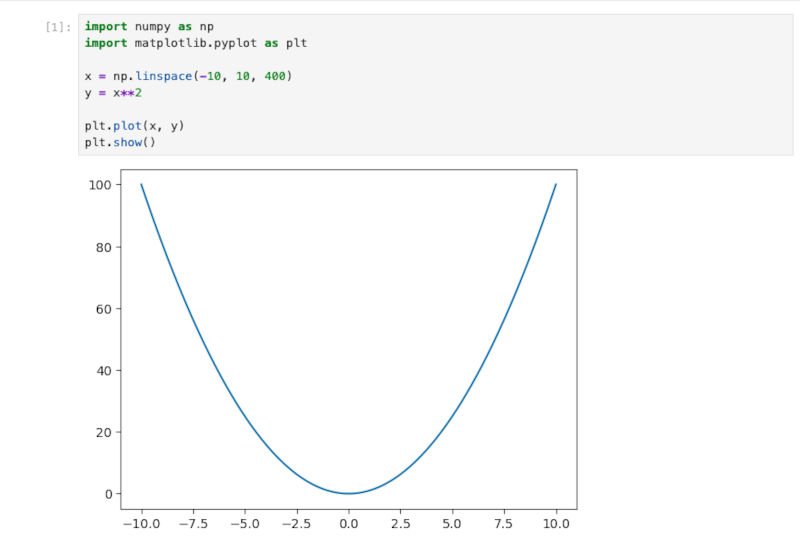
It feels like drawing—with Python.
2. It’s perfect for AI experiments
JupyterLab makes it ridiculously easy to test AI models.
Want to try a small local model with Ollama?
Or a cloud model using OpenAI’s API?
Or a transformer from HuggingFace?
Just write a few lines, run the cell, and the results appear instantly.
Example: Testing an AI Model
import requests
import json

prompt = "Explain quantum computing in simple terms."

response = requests.post(
    "http://localhost:11434/api/generate",
    json={"model": "llama3.2", "prompt": prompt},
    stream=True
)

full_text = ""

for line in response.iter_lines():
    if not line:
        continue
    obj = json.loads(line.decode("utf-8"))
    if "response" in obj:
        full_text += obj["response"]

print(full_text)
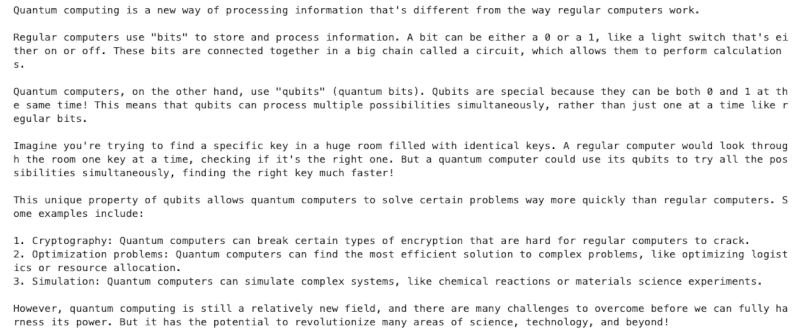
You see how a model responds and how you tweak it.
3. You can tweak things and re-run instantly
This is what makes JupyterLab feel like a toy box for ideas:
Change a value → press Shift+Enter → see the new result.
This feedback loop trains your brain faster.
It encourages experimentation.
It builds intuition.
Want a steeper curve? Change x**2 to x**3.
Want a faster model response? Change the temperature.
Want to test another dataset? Replace the file name.
Everything becomes immediate.
4. Magic sliders and widgets bring your ideas to life
One of the coolest features in JupyterLab is interactivity.
With ipywidgets, you can create sliders, buttons, dropdowns, and interactive charts with incredibly simple code.
Example: An interactive function plot
import ipywidgets as widgets
import numpy as np
import matplotlib.pyplot as plt

@widgets.interact(a=(-5,5), b=(-5,5))
def plot_function(a=1, b=0):
    x = np.linspace(-10,10,400)
    y = a*x**2 + b*x
    plt.plot(x, y)
    plt.grid(True)
    plt.show()
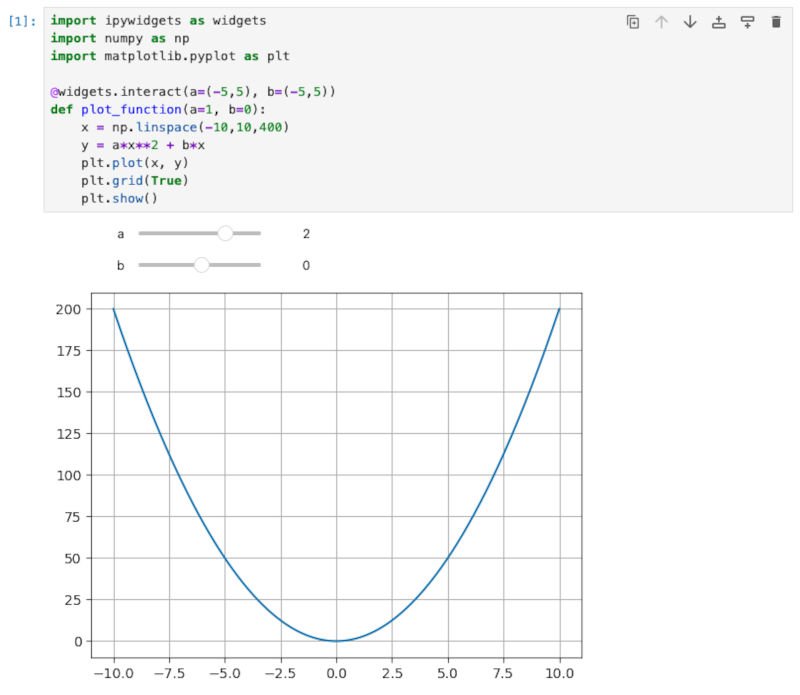
This is not just coding.
This is exploration.
It’s hands-on learning without friction.
Why JupyterLab Is So Popular in AI
JupyterLab has become a go-to tool in machine learning and AI for three big reasons:

1. It supports experiment-driven thinking
AI is unpredictable.
Models behave differently when you tweak inputs or structure prompts.
JupyterLab is built for this.
You can run the same experiment ten times with small changes—and instantly see what works better.
Students can explore.
Researchers can test hypotheses.
Professionals can prototype ideas.
Creators can build content.
2. It makes data exploration simple
Whether you’re loading a CSV file, analyzing text data, or working with images, JupyterLab lets you:
- visualize data
- clean data
- compare datasets
- experiment with functions
- test machine learning models
All in one organized workspace.
You can even save your steps in cells—so your “data story” is preserved.
3. It plays well with every major AI ecosystem
JupyterLab integrates effortlessly with:
- Python (NumPy, Pandas, Matplotlib, Seaborn, Scikit-Learn)
- HuggingFace Transformers
- OpenAI API
- Ollama (local models)
- TensorFlow / PyTorch
- LangChain
- NVIDIA Rapids
- FastAPI
- SQL Databases
- GitHub
This makes it the perfect tool for learners AND pros.
Real-World Use Cases: Where JupyterLab Shines
Let’s make this practical.
Here are real situations where JupyterLab feels like a superpower.
1. Students: Learning and visualizing concepts
From simple algebra to advanced statistics, students use JupyterLab to:
- visualize equations
- plot graphs
- test small code snippets
- break concepts into digestible cells
Math becomes less abstract.
Coding becomes more visual.
AI becomes approachable.
2. Creators & YouTubers: Demonstrations and storytelling
If you’re creating AI content, JupyterLab is the perfect stage.
You can:
- demonstrate an AI model
- visualize how prompts affect output
- explain concepts visually
- experiment live
- show small pieces of code without complexity
You can turn an entire tutorial into a story told through cells.
3. Researchers: Experimentation and reproducibility
Researchers use JupyterLab because:
- They can rerun parts of an experiment.
- They can document every trial in separate cells.
- They can annotate with Markdown.
- They can share notebooks as .ipynb files.
This makes collaboration easy and transparent.
4. Professionals: Rapid prototyping
Need a quick AI tool?
Try it in JupyterLab first.
Data analysts, scientists, and engineers use it to:
- build prototypes
- test API calls
- visualize datasets
- apply ML models
- validate hypotheses
Then they transfer successful ideas into full apps.

How JupyterLab Makes AI Feel Less Intimidating
Many people feel overwhelmed by AI because they imagine complex code, advanced math, and confusing tools.
JupyterLab flips that.
It allows you to:
- write one line at a time
- see output instantly
- combine code + explanation
- work visually
- learn interactively
AI becomes playful.
Coding becomes creative.
Learning becomes joyful.
This is exactly why it fits perfectly into your AI Fun Fact of the Week series—it helps your audience feel comfortable with AI tools that professionals use every day.
How to Try JupyterLab Yourself (Beginner-Friendly Steps)
If you want to start using JupyterLab right now, here’s the easiest way:
Step 1 — Install JupyterLab
pip install jupyterlab
Step 2 — Launch it
jupyter lab
This opens it directly in your browser.
Step 3 — Create a new notebook
Click “Python 3 Notebook”.
Step 4 — Run your first code
Try this:
print("Hello JupyterLab!")
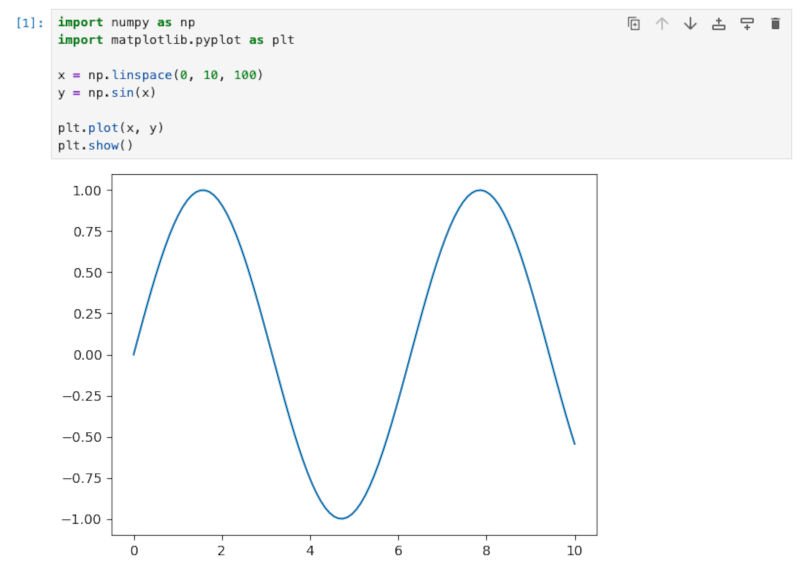
Step 5 — Try a simple function plot
import numpy as np
import matplotlib.pyplot as plt

x = np.linspace(0, 10, 100)
y = np.sin(x)

plt.plot(x, y)
plt.show()
You just visualized a function like a pro.
Making AI Accessible: Why JupyterLab Matters
AI shouldn’t feel like a locked room where only experts have the key.
Tools like JupyterLab open the doors.
They let you:
- experiment freely
- learn visually
- understand AI concepts better
- build confidence step-by-step
Whether you’re a student drawing your first chart…
A professional building AI prototypes…
Or a creator explaining concepts in a fun way…
JupyterLab turns your curiosity into action.
It transforms “What if I try this?”
into
“Let’s see what happens!”
And that mindset is where true learning begins.
Conclusion: JupyterLab Is the Best Place to Begin Your AI Journey
In a world where AI evolves every month, you need a tool that helps you keep up.
JupyterLab is timeless.
Flexible.
Visual.
And incredibly fun.
It makes AI feel like something you can understand.
Something you can experiment with.
Something you can use in your everyday life.
So next time you’re curious about how an AI model works…
Or how a function looks…
Or how a dataset behaves…
Open JupyterLab.
Start a new notebook.
And play.
Because sometimes, the best way to learn AI…
is to have fun with it.
Watch our Video: