
Introduction: What If Your Browser Could Think For You?
If you’ve ever felt overwhelmed by dozens of tabs, endlessly scrolled through articles trying to find one valuable insight, or wasted minutes manually gathering information across multiple sources—you’re not alone. The modern web is vast, powerful… and utterly chaotic.
But what if you didn’t have to fight the chaos?
What if your browser didn’t just display information but actively helped you understand it, summarize it, organize it, and even take action?
That’s exactly what Perplexity’s Comet Browser is built for—ushering in the era of agentic browsing, where your browser becomes an AI-powered partner that anticipates needs, solves problems, and reduces cognitive load.
This is not “just another browser.”
It’s the beginning of a browsing revolution.
In this detailed guide, we’ll explore:
- What makes Comet so radically different
- How it transforms everyday tasks
- How it compares to Chrome, Firefox, and classic browsers
- Real actions it can take for you
- Its futuristic potential
- AND why it may become a must-have for students, creators, researchers, and professionals.
Let’s dive in.
What Is Comet Browser? The AI-Powered Window to a Smarter Web
[Image Placeholder – What is Comet? 02]

A Browser Built on Chrome’s Bones… but Supercharged With AI
Comet is built on Chromium, the same engine powering Google Chrome.
So everything feels familiar—tabs, shortcuts, extensions… they all work.
But the magic lies in the AI layer.
Perplexity has embedded their intelligence engine directly into the browser’s core:
✔ Ask questions directly in the address bar
✔ Highlight text and get instant summaries
✔ Let Comet automatically organize your tabs
✔ Turn YouTube videos into bullet-point notes
✔ Search your browsing history using natural language
✔ Get source-backed, credible summaries without digging
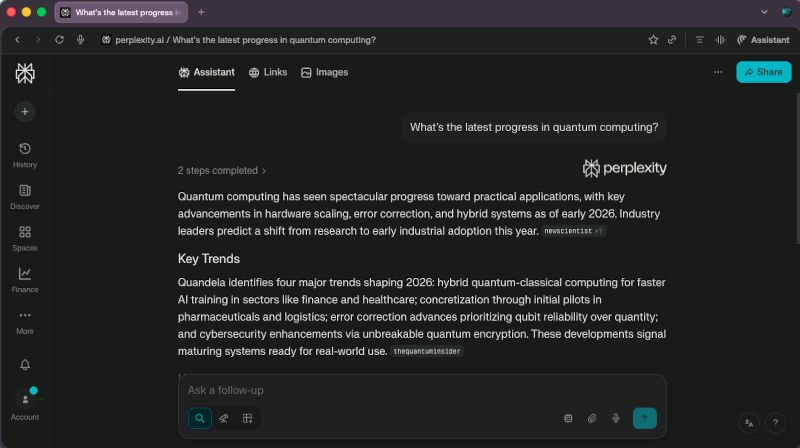
Imagine typing into the address bar:
“What’s the latest progress in quantum computing?”
Instead of three sponsored ads, ten SEO-farmed blogs, and a Wikipedia link—
Comet returns a concise, reliable, cited summary instantly.
Highlight → Right-Click → Instant Understanding
One of Comet’s most powerful features is contextual intelligence.
Highlight a dense paragraph on machine learning ethics and…
→ Ask Comet to simplify it
→ Summarize it
→ Provide counterarguments
→ Explain it like you’re five
→ Or give real-world examples
This isn’t browsing.
It’s having a mini research assistant inside your screen.
Real-Time Intelligence While Watching Videos
Watching an LLM tutorial on YouTube?
Comet can:
- Summarize the video
- Extract key steps
- Answer follow-up questions
- Provide related tools
- Suggest practical applications
All without leaving the page.
This is how browsing should have always been.
Why Comet Feels So Different From Chrome, Firefox, and Even ChatGPT

Chrome and Firefox Are Fast—But Passive
Chrome loads pages in milliseconds.
Firefox has strong privacy tools.
Both are great.
But they still rely on you to:
- Search
- Interpret
- Click
- Compare
- Analyze
- Summarize
You do all the heavy mental lifting.
Comet Is an Active, Intelligent Co-Pilot
Comet doesn’t wait for instructions.
It engages with you.
It looks at:
- The page you’re reading
- The video you’re watching
- The tabs you have open
- Your browsing history
- What you highlighted
- The questions you ask
… and proactively helps you make sense of it.
Think:
🔹 Chrome = A vehicle
🔹 ChatGPT = An external advisor
🔹 Comet = A vehicle + built-in smart co-pilot who knows exactly where you’re headed
No Plug-ins Required – It’s AI-Native
Unlike Chrome, where AI comes through extensions…
Comet embeds intelligence natively.
Like a smartphone with apps built in—not bolted on.
That means:
- No clunky integrations
- No switching windows
- No copy-paste
- No context loss
Comet “sees what you see” because it lives in your browsing environment.
The Productivity Superpowers: What Comet Can Actually Do

1. Smarter Research
For students, analysts, researchers, or knowledge workers:
Ask Comet:
“Compare all open tabs on AI regulation and give me a synthesized summary.”
Comet reads ALL your tabs
→ Groups them
→ Extracts insight
→ Gives you a one-page comparative analysis
This alone is a productivity cheat code.
2. Automated Email Drafting + Integration With Gmail
Highlight notes on a webpage →
Tell Comet: “Draft an email explaining these findings.” →
Comet creates a polished message
→ Suggests tone adjustments
→ Lets you send via Gmail from the browser.
It’s like professional communication on autopilot.
3. YouTube Summaries & Actionable Notes
Watching tutorials? Comet:
- Extracts timestamped summaries
- Creates study notes
- Answers questions using the video’s content
- Suggests follow-up learning paths
Perfect for students, developers, and self-learners.
4. Agentic Web Actions (Mind-Blowing)
This is Comet’s future-defining feature.
Agentic = the browser can take actions, not just answer.
Example:
Planning an AI-themed cocktail party?
Comet can:
- Find recipes
- Compare ingredient prices
- Add items to your Amazon cart
- Suggest decoration themes
- Create a shopping list
Or planning a business trip?
Tell Comet:
“Book the cheapest flight to Tokyo between March 10–14 and find a 4-star hotel under $150/night.”
It can:
✔ Search
✔ Compare
✔ Read reviews
✔ Suggest combos
✔ Add to your calendar
✔ Prepare an itinerary
All inside one browser.
We are now crossing into the territory where a browser becomes a personal AI agent.
5. Morning AI Briefings
Start your day by asking:
“Summarize today’s AI news from reliable sources.”
Comet scans the web, pulls credible information, removes fluff, and can even read it aloud.
A personal AI news anchor—inside your browser.
6. Creative Assistance for Makers & Builders
If you’re a creator, designer, developer, or tinkerer:
- Brainstorm video ideas
- Discover art inspirations
- Compare tools
- Generate code snippets
- Draft scripts or posts
Comet integrates inspiration and execution.
For creators especially, this is huge.
Real-World Scenarios: How Comet Upgrades Your Daily Life

For Students
- Breaks down complex topics
- Summarizes papers
- Makes revision notes
- Cross-references multiple sources
- Helps decode math, science, AI, physics… anything
This is like having a private tutor 24/7.
For Tech Enthusiasts
- Explains new AI breakthroughs
- Summarizes long research papers
- Helps build code
- Tracks AI trends
- Helps explore emerging tools
A smart assistant for exploration and learning.
For Professionals
- Researches competitors
- Analyzes market trends
- Drafts proposals and emails
- Generates insights
- Creates polished reports
Instead of hours… minutes.
For Creators
- Finds ideas
- Helps with scripts
- Summarizes source material
- Helps plan content
- Creates workflows
- Helps analyze audience trends
Your creative co-pilot.
The Future: What Comet Signals About the Next Era of Browsing

Comet isn’t just a browser—it’s a glimpse of the future.
We’re entering a world where:
1. Browsers Become Intelligent Operating Systems
Not just displaying pages…
…but managing tasks, automating workflows, and collaborating with other apps.
2. Information Overload Becomes a Thing of the Past
AI will:
- Filter noise
- Surface insights
- Interpret complexity
- Deliver clarity instantly
Browsing becomes insight-first, not link-first.
3. Agentic Browsing Becomes the Norm
AI will:
- Predict needs
- Automate actions
- Manage your digital life
- Orchestrate cross-app workflows
Imagine:
Your browser notices you’re reading travel blogs → suggests itineraries → syncs calendars → explores deals → prepares packing lists → books your trip.
We are not far away.
4. Privacy & Security Will Evolve
With agentic browsing comes:
- More advanced threat detection
- AI-powered phishing protection
- Prompt injection safeguards
Comet is already experimenting with these.
5. Competition Will Explode
Google, Apple, and Microsoft will respond.
Chrome may get a massive AI overhaul.
Safari may embed agentic intelligence into iOS/macOS.
Edge may become an enterprise AI router.
Comet is just the beginning.
Comet’s Weaknesses (Yes, It Has a Few)
To keep this guide honest:
⚠️ Heavy on system resources
⚠️ Agentic tasks sometimes glitch
⚠️ Still early in development
⚠️ Not all websites support automation
⚠️ AI accuracy depends on Perplexity’s models
But none of these overshadow its massive potential.
Conclusion: Should You Try Comet Browser?
Absolutely.
Comet isn’t just “another AI tool.”
It’s a redesign of how humans interact with the internet.
If you’re:
- A student
- A tech enthusiast
- A creator
- A researcher
- A professional
- A productivity nerd
- A curious mind
…Comet will change how you browse forever.
The future of browsing won’t be passive.
It will be intelligent, proactive, and beautifully intuitive.
And Comet is leading the charge.
Watch our video: